- @fraggle22 It was tough trading it in. Not a fun day, but for the best. in reply to fraggle22 #
Twitter Updates for 2010-08-28
- Goodbye, Dorkmobile: http://bit.ly/cIeYm1 #
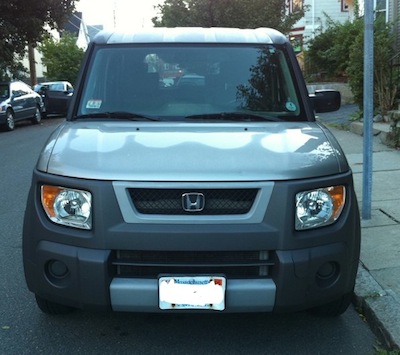
Goodbye, Dorkmobile
Goodbye, Dorkmobile.
It seems like it was just yesterday (it was 7 years ago) when I made a ridiculous decision to buy your boxy ass. I had seen you on TV and on the internet and you seemed like a perfect fit.
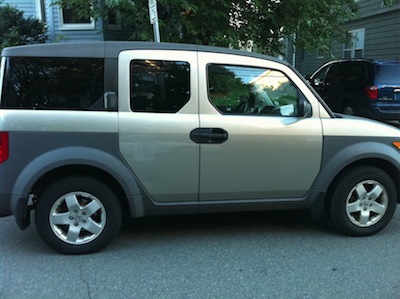
You had loads of space. I needed a place to carry my softball and basketball stuff!
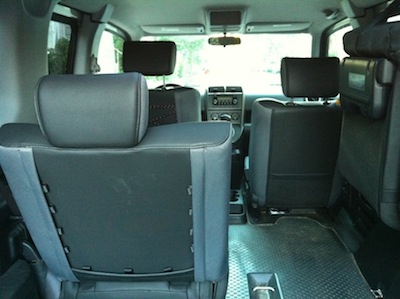
You got ok gas mileage. I liked not spending a ton of money on gas!
And so it began. Me and you, through some of the biggest years of my life.
- You helped me move into my first solo apartment, carrying both a washer and dryer (for 25 bucks!) in your ample belly.
- You carried me and Katie on our first long car trip to a wedding in Virginia (14 hours both ways!), keeping us safe during a drug bust while we filled up in West Virginia
- You got your first scar during a crazy winter storm when I 360'd on 93N, heading home from a Celtics game. Your fender grazed the guard rail, keeping me from ending up in a much worse scenario.
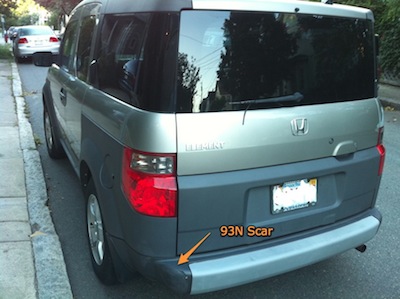
- I never figured out where you got your second scar, a busted up front fender guard, but I'm sure it was doing something to keep me happy or safe.
- You took me to the hospital when I busted up my nose.
- You carried my niece and nephew to their first trip to the aquarium!
- You helped me move out of my last apartment and into my first home, carrying couches, chairs, whatever I could jam in you.
You've been there for the good and the bad, but your age is showing. I've had to replace your brakes a couple of times (even though I don't drive all that aggressively). I've replaced your tires and your struts more than I should have had to. Your driver's side door lock works too well--sometimes I can't get the door open.
Finally, your AC went. It was going to cost a lot to replace it. I started looking at new cars. I couldn't get another Element--nothing could replace the Dorkmobile.
So, I settled on a Honda Civic Hybrid. I won't have to fill it up with gas nearly as often. My ride will be much cooler, now that the AC will work. It'll be quieter too, as the years had caused your shocks and frame to creak and rattle a good bit. The whole environment thing.
But, I promise, I'll be sad when I trade you in. I already am. You're little car face will make me sad. It'll make me sadder the first few days when I walk outside to drive to work and see my neighbor's nearly identical Element (your cousin) sitting there. I know I'll try to get in it once or twice.
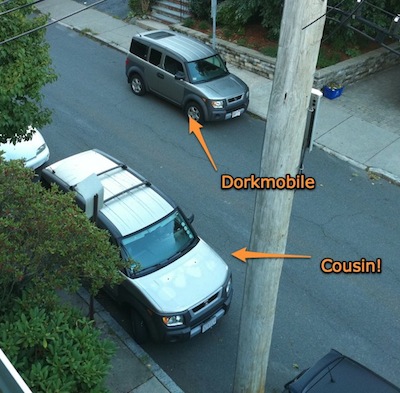
The good news: you're going to get fixed up. Some cosmetic surgery to fix your scars. Probably a new driver's side seat. Some nice new parts to make your ride smooth. You'll be a new Dorkmobile.
It'll be a fresh start for both of us, and you'll get a chance to make a new dorky owner happy.
Happy trails, Dorkmobile.
Twitter Updates for 2010-08-27
- Netflix is out for the iPhone. I will officially never get anything done again. #
- @wintermatt I want in! Unless it's me. I don't think it is though. in reply to wintermatt #
Twitter Updates for 2010-08-26
- $15 later, I remember why I rarely eat at @aubonpain. A sandwich, mac and cheese, and a drink. That's about $6 too much. #
- Possibly the greatest Tumblr ever: http://fuckyeahvirginiatech.tumblr.com/ (via @TechHoops) #
- Yeah, I could spend hours http://bit.ly/bdisSN for stuff like this: http://bit.ly/d7gIQb #
And, in case you haven't heard it ...
I tweeted this the other day, but this is probably the best song of 2010 so far.
It's not safe for work. And really not safe for kids.
But amazing all the same.
Getting Organized with OmniFocus
My job tends to be a little ... disorganized. It's incredibly interrupt driven (we're an internet company, and I end up working on projects that are either very time-sensitive from a "need to get this done now" perspective or from a "uh oh, many many customers are in need of a fix" perspective.
In both cases, that means whatever I was working on gets dropped, back-burnered, ignored, whatever. I used to deal with that by leaving emails flagged in my inbox, writing emails or post-its to myself, or, wellll ... just forgetting what I was working on before.
In any event, it was not a particularly good way to manage my time.
People have been hyping the "Getting Things Done" methodology for the last few years; it's been almost impossible to avoid the hype in the tech corners of the internet. It seems to be a pretty good philosophy for keeping track of what you're working on and working on the right stuff. In a nutshell, you either:
- Do it right now
- Ignore it completely
- Put it somewhere that you'll know to do it later
- Make someone else do it
Nothing groundbreaking, but a good framework.
The problem was, I was doing that all through email, which meant that (on good days) my inbox would be flooded with 10 or 12 flagged items (reminders to do stuff), with more stuff piling on top. Manageable, but not a particularly good way to do stuff (and it ensured that certain things would never get done until someone came and bitched at me).
Then OmniFocus came out for the iPad and I saw some videos and I said "a-ha!" This is what I need to manage all of the crap that flows into my inbox. I grabbed the Mac download and tried it out for two weeks. I spent a couple of hours on a Saturday morning throwing a bunch of my to-do items into the inbox, organizing them, setting up projects, and adding due dates.
It took a week or so to get the hang of it.
And that's what the folks at The Omni Group expect. They give you a two week trial so that you'll dump your life into it, get the hang of it, and then need to pay them a reasonably high price (but, so far, worth it) to keep it going.
Now, every morning, I run through my to-dos for the day. Anything that isn't pressing, I'll either take the due date off of completely (so that it's not in my face), or I'll push it back to an appropriate day. As stuff pops up in my inbox, I grab it and throw it into OmniFocus and then clear it out of my email.
It's a nice system.
It goes a lot deeper than that, but even if you just use it for breaking down your tasks, that's probably worth it.
Rather than having 20 flagged emails in my inbox, I head to work and look at my work to-do list, and I've got the list of things that are past due, due today, and due over the next few days. When someone asks me "hey, do you have time to work on X", I can give them a quick rundown of what's on my plate and ask them which stuff can get pushed off.
Throw in the fact that I'm also managing all of my personal tasks (buying groceries, remembering to clean the kitchen floor, calling to get my wisdom teeth out), and you can pretty quickly see how the value adds up. Oh, and fun stuff like recurring tasks ... say, posting to a blog that you've left wilting on the vine.
OmniFocus just happens to be the app I ended up on. There are others out there (as well as a million and one ways to do it using Outlook, Gmail, text files, etc).
This tutorial is what got me hooked. If you have 30 minutes, see if the philosophy at least makes sense.
6 Weeks of Concerts, 8 Minutes of Video
Apologies in advance for the pedestrian entry. It's about 2 weeks late and I would have had more to say if I had written this more real-time. Instead, you get a video. So, that's cool.
Over the past few weeks (about 6, to be exact), we've been had a nice run of concerts. First, we had a bill of We Were Promised Jetpacks (best name in music) and Tokyo Police Club (one of the best names in music) at Royale in Boston.
I'd been a bit turned off over the past couple of months at shows, as the crowds had gotten decidedly disinterested in the music and interested in chatting it up and being seen (which is why a place like TT the Bear's is nice -- no one goes there to "be seen"). This was show was better -- it was a random Thursday night, school was over, so it wasn't a scene. It was just a few hundred people who liked the bands there to check them out. Both were spot on.
Then, a few weeks later, we hit up Bank of America Pavilion (probably my second least favorite place to see a show) to see Arcade Fire. Arcade Fire, at the time, were probably the only band I really love that I'd never seen live. They didn't disappoint. Just a spectacle from beginning to end, only tempered by the fact that BoA Pavilion is such a craptastic venue.
Finally, a few days after that, we checked out Interpol at House of Blues. They played a nice mix of older stuff and stuff off the new album (which sounded pretty good). Interpol isn't a hugely dynamic band (especially compared to Arcade Fire), but it was a good crowd and Interpol seemed to feed off it and really ripped into things.
Anyway, after all that, I decided I wanted to screw around and learn iMovie a bit. So, for your pleasure, here's four bands and probably 5.5 hours of music cut down to 8 minutes.
Travel With the iPad - 10 Days On The Road
I wrote this a couple of weeks ago -- I just hadn't had a chance to edit it until now.
Sitting about 6 miles above the Earth in a cramped airplane seat, I'm banging out a summary of my experience traveling with the iPad. This is the wifi-only iPad, one that I've had since day 1. I'm using the Apple bluetooth keyboard, which makes typing something a bit longer like this significantly easier.
The Ugly
- Oleophobic, my ass. The screen, because of it's size and how often you're touching it, picks up fingerprints like crazy. Since it's bigger than the iPhone, you can't just run your sleeve across it to clean it. You best get used to the screen being covered in fingerprints (it's really ok) or you better bring a cloth.
- The Apple Case. I actually like the Apple case more than most. It's small and lets you prop up the iPad in the different ways you might want to use it. However, it collects dirt and grime like a vacuum. It's horrific.
The Bad
- No multitasking. Now, while this gets resolved this fall, it is a bit of a pain. It's not really a huge pain in the ass, like you might guess. It's just an annoyance. You're watching a movie and want to pop over and check some email--you have to change apps. Can't just let the movie's audio play in the background. Want to click visit a site or search for something you saw in Twitteriffic or NetNewsWire? Have to stop using the app, switch over, then switch back. It's not great. But, it only affects you maybe 5% of the time. The rest of the time you're happily watching a movie or reading a book and not planning to do many things at once.
- No wireless podcatching. This, to me, has been the far more egregious failure than the lack of multitasking across the iPhone and iPad. The iPad (as I'll get to later) has really proven to be ideal for travel: listening to podcasts while reading a book or reading some downloaded feeds. Except, after 24 hours of flying to Australia, I've listened to my podcasts. Over the next few days, if I'm lucky enough to find a wifi signal, I want to grab some updated podcasts to listen to on the plane home. Does iTunes know my podcasts and automatically sync them? No. I have to manually search through the iTunes Store looking for the ones I want to listen to, find the new episode, and download it. Why can't the iPad (or iPhone, for that matter) be smart enough to know what podcasts I listen to (it can get the list from my iTunes when I cable-sync), give me an option to update those, and download 4 or 5? For a device that's so wonderful to use, this is one of the worst experiences on the iPad.
- App pricing. I'm not sure how I feel on app pricing, quite frankly. I don't mind paying a bit more for an iPad app than it's iPhone counterpart. But some of the new apps (non-universal) are just money grabs (ahem, SplashID). There's no new functionality. In some cases, it's just a layout change. Paying 2 or 3x as much to have a second iPad-only app is something I think we'll see die over time. When that happens, I think app pricing will move off of the "naughty" list onto the "nice" list.
- Really poor cookie retention. I tend to use reasonably secure passwords, and I've relied on PwdHash in my browser to make that easy. But, once I get the password in there, it's nice for the browser to keep me logged in. Safari on the iPad seems to expire cookies really fast. Though maybe I'm dumb and missed a setting somewhere
The Good
- The battery life. Holy Jebus. A computer that--using it off-and-on to watch movies, read books, read downloaded feeds, play games--lasts an entire trip to Australia. Literally. I watched two episodes of Doctor Who (love the new Doctor, by the way), read most of War of the Worlds, watched a movie and a half, played a bunch of Enigmo, and read through about 2000 synced articles in NetNewsWire. Most of that while listening to music or podcasts. And I arrived in Australia (a 5 hour flight from Boston to Dallas, 4 hour flight Dallas to LA, and 16 hour flight from LA to Melbourne) with about 20% of my battery remaining. On the flights back I've read through another 2000 articles, watched another movie, read through the NY Times articles, and now typed this out. The battery is currently at 56%. Unbelievable.
- The size. It's small enough that I just through the iPad and bluetooth keyboard in my carry-on. No laptop bag. It hung out with my water bottle and sweatshirt. No special case. Didn't have to take it out for security (except in Sydney, I think, where they might not have known what it was). Popped it up on my lap comfortably. Used it in a sleeping back propped on it's side to watch half of a movie when I was still on East Coast time and everyone else was asleep. Read through a couple of books in iBooks the same way. Just really, really easy to bring around. I would have hated bring my laptop (or a netbook and it's power adapter) to a place like Wilson's Promontory in Australia. The iPad was perfect.
- The screen. As bad as the screen is at picking up fingerprints, it really does shine for video. I'd ripped some of my own movies that I had gotten recently and not watched yet -- watching them on the iPad was almost as good (especially from 18 inches away) as watching them on the big screen. Certainly a better screen than the one sitting in the seat-back in front of me.
Now, I've had a couple of bad screen experiences (sitting in bright sunlight, you're screwed due to reflections and due to the fact the iPad will heat up too much to use). That's going to make beach going a challenge for most folks. (though I'm pasty white and spend 99% of my time under a parasol, so maybe not for me ...)
- iBooks. You know, I didn't really think I'd do much with it. I'd been reading Sherlock Holmes in Stanza on the iPhone. I grabbed it and War of the Worlds in iBooks, and it was just a great way to kill time when trying to adjust to a 14 hour time difference. It's also pretty much the one app were portrait mode is far better than landscape. If I'd ever really found a reliable wifi signal in Australia (poor Aussies and their horrible broadband), I probably would have grabbed a new release book and read that. But then I wouldn't be typing this.
- The interface. There's no mistakes. There's no lost keystrokes or misinterpreted mouse clicks. Never has the interface lagged behind what I am trying to do, or never have I waited while an hourglass or beach ball spun and the UI tried to catch up. You don't know how big that is until you realize you've spent your entire trip doing stuff, rather than waiting for stuff.
In the end, the iPad is just a phenomenal travel tool because of the convenience. Everything about it (well, except the fingerprint magnet of a screen and the dust magnet of a case) is design to make it easy to bring with you and do whatever. You never need to charge it (I charged it twice in 10 days). You can get through airport security without unpacking it (generally). You can watch TV, movies, read a book ... basically whatever you want. If you have wifi (or the new 3G model), you can do even more. (Or, when someone figures out how to tether it to an non-jailbroken iPhone.)
My new iPad
To paraphrase Spoon ...
"I'm blogging this to you from an iPad ... Someone better call a [something that rhymes with iPad]"
This is a legit game changer. Believe the hype.