Chris Kluwe: NFL Punter, Spokesperson for Equality

"The only impact same-sex marriage will have on your children is if one of them turns out to be gay and cannot get married. What will you do (and I ask this honestly) if one or more of your kids ends up being gay? Will you love them any less? What will your actions speak to them, 15 years from now, when they ask you why they can’t enjoy the same relationship that you and your wife have now? And if your response is ‘We’ll cross that bridge when we come to it’, well, for a lot of people that bridge is here right now. They’re trying to cross it, but the way is barred, and I will do my best to tear those barricades down any way I can because I believe that we are infringing on the free will of other human beings by denying them their basic right to live free of oppression. I love my daughters for their minds and their personalities, not for who they love as adults. That’s none of my damn business, and I will support them in life no matter who they want to marry."

(Chris Kluwe - Out of Bounds Blog.)

I legitimately love that the single loudest, most coherent, forceful spokesperson for marriage equality is a straight, married, NFL punter. The only way it would get better is if he was a defensive lineman. Could you have a better perceived dichotomy than "NFL player" and "marriage equality supporter".

It's a tremendous sign for society that there are now NFL players willing to come out on the "supporting gay marriage" side of this argument. There have been other players and former players (Charles Barkely, Steve Nash, Matt Cain, and more) who have publicly supported equality. But none of come out quite as forcefully as Chris Kluwe.

Which is probably ok, because it seems to be Chris Kluwe was singularly born to do this. Even in his polite, politically correct response, he still manages to drop a sparkleponies reference.

Getting Started with iTunes Match

With iOS6 and the iPhone 5 out, and with iTunes 11 on the horizon (coming in a few weeks), I'm expecting more folks will start using iTunes Match. iTunes Match is pretty straightforward, but there are some little things I think are helpful to know before getting started with iTunes Match.

The most helpful thing is to get your library under control. As best as you can, you'll want to make sure everything is well named (i.e. get info for all of your "Unknown Artist, Unknown Song" tracks). There are loads of apps out there to help you tag your tracks without a lot of manual intervention. The best is probably TuneUp. It's pricey, but it'll help you get as many of your songs tagged properly.

The reason for getting your songs tagged is simple: when you're using iTunes Match, you need to have some way to identify the song you want to download to your iPhone. If you can't tell by the name, you'll have to preview the song, which means downloading it anyway. So, tag your music (or at least the music you care about) to make it easier to grab over the air.

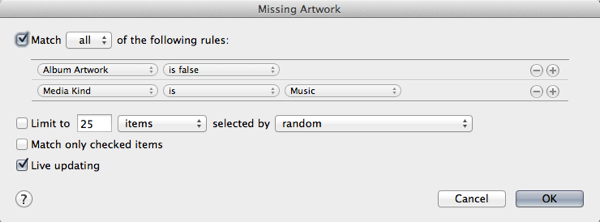
Once your music is all nice and neat, you might as well use iTunes extensive album art library to make your music pretty. There's a simple way: make a playlist of all your music that has no artwork. That'll look something like this:

missing artwork

Then just click on that playlist, select all, and right-click, and choose "Get Album Artwork". Or you can choose "Get Album Artwork" from under the Store menu.

Now that you've got your music well named and full of pretty album art, you're ready to get things onto your iPhone or iPad. If you follow along with Apple's advice, you'll just go into the Music app on your phone, click on a song or album and download them one at a time.

That is perfectly fine if you have a limited set of music (a few albums, maybe a few hundred songs). Once you want to get a few GBs of music on to your phone (you know, your iPhone you spent a bunch of money to get 32 or 64GB of memory), this whole one at a time method sucks. It sucks hard.

There's a solution here, though. And it's an easy, old school one: turn off iTunes Match. Get all of your music ready, sync it to your iPhone/iPad the old school way over USB/WiFi. Get your gigs of music onto your iOS device, then turn on iTunes Match. iTunes Match will say "hey, I'm going to replace your library" and you're good.

iTunes Match will now utilize all of the music that is on your phone, and you can just use iTunes Match to bring over new music as you get it, or when you get the inkling to listen to something you didn't sync to your device originally.

I think if you follow these basic guidelines, you'll very much enjoy iTunes Match the way it should be—without thinking about it. It'll just work.

Even if you don't want to use iTunes Match, you should still pay apple the $20/year or whatever it is, just so you get a full backup of all of your music. That's worth it, in and of itself.

Seriously, go do that right now.

iOS6 and iTunes Match: What's New? (Not much)

Back in May, we hit the semi-anniversary of iTunes Match. About 4 months later, after the release of iOS6 and Mountain Lion, where do we stand?

For the most part, we're almost in the same spot. In May, the outstanding issues really amounted to:

  • Occasionally flaky album art updates
  • Play counts not syncing from iOS devices
  • Some smart playlists not working the way you'd expect
  • A somewhat unintuitive way to manage adding songs to your iOS device

What's Better?

Album art seems to be almost completely fixed. I haven't noticed what the change is—whether it's just the initial syncing of the art when you grab the music or doing some smart syncing behind the scenes—but things are definitely better. I have yet to see missing or incorrect art, even when listening and skipping through music without a data connect (i.e. on the subway).

Smart playlists just seem to work now. At least mine seem to. The ones that always seemed out of whack before ("recently added" songs) seem to update appropriately and they match what's in my iTunes, which means maybe they're reflecting the authoritative library date, rather than when they were added to the iOS device. Or, I'm just lucky enough that they sync up right now. Still, it's a good sign.

One thing I've noticed anecdotally is that metadata (ratings, last play date, etc.) seems to sync much faster than it did before. I could very well be crazy, but it seems like both iOS and iTunes are pushing out their changes reasonably quickly, and that means things seems sort of magic. You update a genre or a star rating on iTunes, and before you have time to think about it, it's already on your devices. That's good and sort of the promise of iTunes Match -- "any sufficiently advanced technology is indistinguishable from magic".

What's the Same?

Play counts still don't sync. The first track you play might update its play count. Nothing else does. I don't get it. I don't get why other meta data updates but not play count. This is very distinguishable from magic.

What's (Arguably) Worse?

Managing music on the device seems to have taken a step back. You still have to flip the switch (in Settings.app, which isn't a huge deal) to show all music, or just what's local. When I want to play something not on my device, I flip the switch and then go to the album (or playlist) it might be on. Except now there's no sign that it's not on my device. The iCloud icon shows up only on the "collection" level -- album, artist, playlist. It doesn't show up on a song by song basis. I can click the song to play it -- but does that cache it and save it to my device (it does). Or, I click the iCloud icon and it will download every song on that list that's not on my device … which may include things I don't want at this moment.

I don't think this is a huge deal for most people. You're either a song buyer or an album buyer, and in both cases, if you want it on your phone, you're getting everything in that bucket. But, it is something to be aware of, and it's certainly something that deserves a nicer interface than what we're given in iOS6.

The Gist?

iTunes Match is solid. It does what you want almost all of the time. If you're someone who is careful about the care and feeding of your iTunes library, you might notice some of the little hiccups, but I don't think the average person will. I think for most folks, they'll end up with their music in both places.

With iTunes 11 coming next month, we could see another iteration of iTunes Match features.

Microsoft and Apple Battle It Out. The Victim: My iPhone Battery

Mostly writing this up so that I'll remember how to fix it the next time it happens. Because, we both know, it will happen again.


I've been traveling a lot lately. Hawaii (vacation), home for a week, Austin (work), home for 3 days, San Francisco (work). So, I relied pretty heavily on my iPhone while I was out and about (checking email, keeping in touch, getting un-lost, etc.)

When out in San Francisco, I wasn't completely surprised when I got towards the end of the work day and noticed that my battery was in the red. I was caught off guard, but I figured "well, I must have crushed it today using the cell signal and GPS and all that." It died just after helping direct me to the local train station to catch the train to the Giants' game.

I plugged the phone in when I got back to the hotel, let it charge up overnight, and figured all would be well. A couple of hours later, my phone was down to 20% battery. And it was ridiculously hot.

This was disconcerting.

I twiddled every setting I could find, turning off GPS, wifi, bluetooth, pretty much anything on the phone I could find. I killed every app. I restarted the phone. Nothing helped: my iPhone was losing its battery at about 1% a minute, meaning it would maybe last 2 hours. If I was lucky.

That was not going to be a fun way to deal with my travel day home.

I googled everything I could. I tried everything I found on the google. Disabling contact syncing. Killing everything, restarting, killing everything again, and restarting again. Spinning the phone around three times while saying "Beetlejuice."

Nada.

I bought a handful of the "System Status" apps, hoping one would show me some process was stuck running. No such luck.

Finally, I stumbled on a link from a site I should have searched right away, Ars Technica. A couple of mentions of "Exchange going rogue."

Huh. I have Exchange. And, when I'm away from work, I end up in a weird state of using a bunch of different clients (my iPhone, iPad, the web interface, and—if I'm lucky—Entourage over VPN). Maybe something had gone wonky.

Delete Exchange account.

Reconfigure Exchange account.

Minutes later, the phone was cool. My batter was staying strong. Sitting in the airport bar, I kept checking my battery, waiting for it to start dying. It hung tough at 25%. 6 hours later, upon arriving in Boston, it was still alive and kicking.

Success.

I should have know. When in doubt, always assume that the battle between Microsoft and Apple will be fraught with danger and innocent victims.

Frenemies

Frenemies

In iOS 6, I this battle extends to Apple and Google. Keep your charger handy.

Chris Kluwe Wins the Internet

"If gay marriage becomes legal, are you worried that all of a sudden you'll start thinking about penis? 'Oh shit. Gay marriage just passed. Gotta get me some of that hot dong action!' Will all of your friends suddenly turn gay and refuse to come to your Sunday Ticket grill-outs? (Unlikely, since gay people enjoy watching football too.)

I can assure you that gay people getting married will have zero effect on your life. They won't come into your house and steal your children. They won't magically turn you into a lustful cockmonster."

Chris Kluwe just won the internet. This is exactly the way the debate about gay marriage should be framed.

And it all comes from an NFL punter. Who'd a thunk it? Kudos, sir. This is phenomenal.

(Via Deadspin.)

Pushing Growl Alerts into Notification Center

Until Growl 2.0 is released with its support to pump Growl notifications into the Notification Center, MountainGrowl is here to very cleverly solve that problem.

And, the way it is implemented, it works perfectly with things like Boxcar.

Installed.

Twitter: "Set Doucheyness to full"

"As some of you may have already noticed the download link for the Tweetbot for Mac alpha no longer works. Twitter’s latest API Changes means now we have a large but finite limit on the number of user tokens we can get for Tweetbot for Mac. We’ve been working with Twitter over the last few days to try to work around this limit for the duration of the beta but have been unable to come up with solution that was acceptable to them. Because of this we’ve decided its best for us to pull the alpha."

The recent Twitter API changes were restrictive, but there were at least rumors that Twitter was being "cool" about working with the existing developers and apps out there. You know, so Twitter's users don't suffer.

But this is a sign that Twitter is going full speed ahead on their doucherocket.

I get that they want to dissuade new developers from entering the space. I think it's stupid and short-sighted and that, in the long run, Twitter is condemning themselves to a world where they'll be a new AOL or Friendster. But I get that this is how they think they need to make money (rather than, say, making it possible to have developers build their apps in way that is complementary to Twitter's advertising/revenue model).

This is just capricious, though. How should devs test their apps? A small group of beta testers with a required "Revoke Access" at the end?

I expect that, over the coming 12-24 months, a lot of folks Twitter usage will start to erode. Not enough for Twitter to feel it in their numbers, but it'll be the early adopter, bleeding edge folks. The folks who get covered in the media, who set the tone for "what's cool." The folks who Twitter built their business on the back of.

Once a high profile user (i.e. celebrity) defects, I'm guessing it'll be enough to get the ball rolling.

Twitter will revise these ridiculous requirements. It's just going to take some time.

If I were Facebook, I'd be looking at building a status-type application and embracing the developer community.
(I don't think app.net is the answer, but maybe it'll ruffle a few feathers before imploding.)

(Via The Tapbots blog.)

Later, Hawaii

We're heading home now, but we'll be back.

Rainbow

Flower in Lava

Road Closed

Akaka Falls