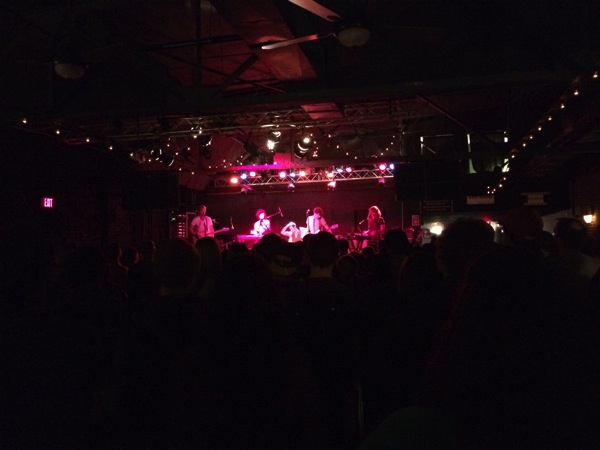
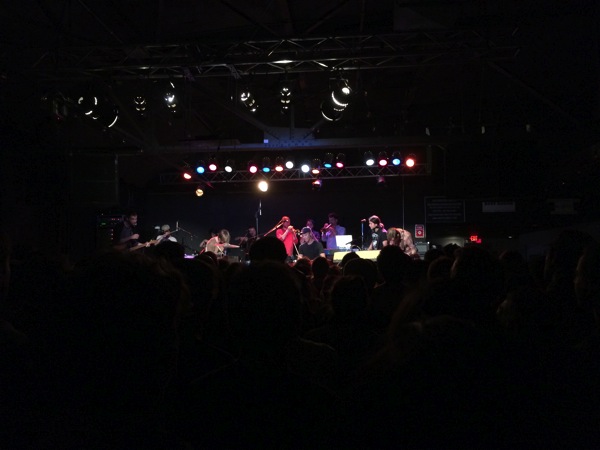
I mentioned Typhoon a few posts ago. I think they’ve put out my favorite album of the year, and certainly put on my favorite show of the year (thus far).
Just watch this. If you like music, at all, you’re going to smile. Harmonies, hand claps, horns, whistling; it’s all there. Seriously, just watch and smile.
I used to run. There was a point in time at a previous job, where I wasn’t super happy, nor particularly engaged, and I could get out of the office at a normal time and go running. Distance running has never been my thing, but I would run 4–5 miles a day, 5 or 6 days a week.
Over the past few years, I’ve fallen into some bad habits. I’d go through phases where I’d run a few miles a couple of times a week; then it was running a few miles at the gym a couple of times a week. Until the last month, it was run every couple of weeks and pretend that the exercise I get from softball and basketball is enough to get by.
Periodically, I’d use something like Runkeeper to try to motivate me. “Hey, you should go running and try to do better than you did yesterday.” The downside—I’d often get frustrated because going from running 4–5 miles a day to 2–3 miles every couple of weeks was a big step back and seeing that displayed to me when I started the app was demoralizing, not encouraging.
I went through these cycles for a couple of years.
And, honestly, this isn’t any sort of amazing revelation, but just using an app like Pedometer++[1] is enough to help get me up and moving a bit more. It just measures your steps each day, and you can set a goal. It’s a Fitbit[2], but comes in a device that’s already in my pocket 90% of the day. It’s just enough prodding. I open the app, see I only have a few thousand steps, and I’ll go for a run (I went as far as to buy a thingy to carry my phone while I run). Or I’ll walk the long way to grab dinner.
It’s not much. But I’m sitting here on 9,300 steps for the day (which doesn’t count the hour and a half of basketball, or hour plus of softball – so I’m really probably closer to 20,000 steps), and I’ll probably go walk around a bit to get over 10,000 steps for the day.
It’s so incredibly stupid that I am motivated by a little number, and not by simply getting in better shape or generally being healthier.
But, it turns out, that seeing the little values go to 10,000 is just enough prodding.
I’ve avoided the Fitbit or Nike Fuel or any of those things forever, for a couple of reasons. One, I hate carrying things. I don’t wear jewelry or watches. I try to have as little in my pockets as possible. But, I think I should have joined the crowd and grabbed one of those things. I’d likely have figured out that I’m motivated by seeing round numbers a long time ago.
I’ve been using Mavericks for a couple of days now. I’m sure I’ll have more thoughts about it later (particularly about the multi-monitor support). But, right now, here’s a couple of gotchas that I found when using the new iCloud Keychain.
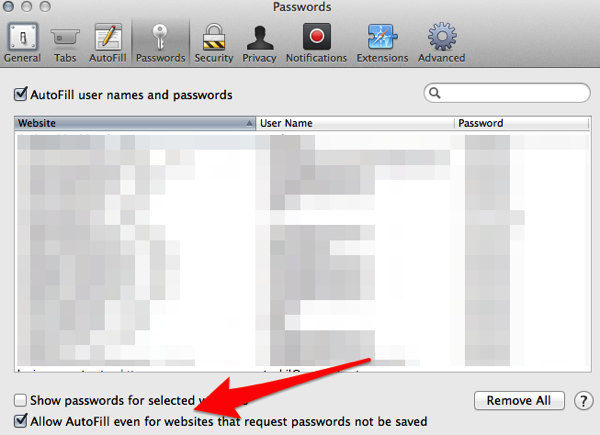
Turn on the ability to save passwords even when a website requests you not
Both on the desktop, in Safari, and in Mobile Safari on your iOS device, there’s a setting that controls whether or not you can autofill a password with your iCloud Keychain password. Since you probably want to control when you can autofill the password (not the website), you’ll want to override the default.
On the desktop, that’s in Safari’s Preferences, under Passwords. Down the bottom, there’s a little checkbox that says “Allow Autofill even for websites that request passwords not be saved”. Check that box.
On your iOS device, go to Settings -> Safari -> Passwords & AutoFill, and turn on “Always Allow”.
Now you’ll never get that error message that you can’t use your saved password.
iCloud Keychain Doesn’t Save the Right Password if You Use PwdHash
I use a Safari Extension called PwdHash (that I actually created, built off of the open-source PwdHash extensions). PwdHash does a nice thing where it generates a new password for you on a site, based off of a password you know. That way, no matter what computer you’re on, or what browser you’re in (assuming you can find a PwdHash extension or bookmarklet), you can login to a site.
It’s pretty handy.
However, the way the Safari extension works (and this may be my fault), it picks up the password I typed in (my “master” password) and not the resulting hashed password after the extension runs.
…which means it ends up syncing the wrong password. That’s very possibly my fault, but could also be just a mechanism of how Safari/iCloud Keychain decides what to sync. It does mean that I need to be careful when saving passwords[1].
However, as I go around creating new passwords, Safari’s new “suggested password” feature may make my need for the PwdHash extension moot.
It’s taken me a few weeks to sort out what I wanted to say about seeing Typhoon live for the first time. They put out my favorite song of 2011, and I think White Lighter is the current favorite to be my top album of the year, with three or four songs on it that I might like better than anything else I’ve heard this year. But, I’d never seen them live (which is somewhat rare for bands I really enjoy). They’d never really toured the East Coast.
Radiation City opened for them, and it was one of those great concert moments where you get exposed to a really good band that you’ve never heard of, and you begin to realize “Hey, this crowd is pretty cool right now. Into the music, not much talking, no one pushing to the front.”[1] I think most people who were there were as excited as I was to be there, and people were, sort of, on their best behavior.
Radiation City played a really great set of synth-backed pop with lots of harmonies—right up my alley—but a bit slower than you might expect. Worth checking out on Spotify.
Then Typhoon came out. And from song one, they just owned it. Eleven band members, strings, horns, multiple drummers, and vocals and lyrics that just sort of wring emotions out of you.
It was this big, cathartic release. A bunch of people waiting to see a band, the band coming out and being better than anyone probably expected, and the crowd just reacting with sheer joy. That joy was clear to the band, who acknowledged the crowd’s boisterous response more than once, giving the old “you’re the best crowd we’ve ever played in front of” spiel, but saying it like they meant it, which would just make the crowd react even more.
I know, I know. This all sounds ridiculous. But, sometimes you talk to people who really love Phish (or, if they’re a bit older, the Grateful Dead; it’s always a jam band), and they tell you about these shows where everything happened a certain way, and the lights were just right, and the crowd was just right, and the music segued just right.
That’s what this show felt like. Everything kind of all came together—a band firing on all cylinders, a crowd that had waited years to see the band—and it lead to a really, really wonderful show.
Complete aside about concert crowds. They mostly suck. Obviously, it depends on the bands you see, but, if you’re seeing a band that attracts a college audience, it’s going to suck. College kids are college kids, and I now feel horribly old saying this, but they’re shitheads. I mean, we all were in college. But, when you go to a show for a band like Ra Ra Riot, you don’t expect to see bros jumping up on the stage and then stage diving. Or when seeing Clap Your Heads Say Yeah, you don’t expect to spend the entire show with a bunch of college hipsters pushing their way to the front to dance spastically because they “love the band.” We’re all there for the band, dipshit.
Nada Surf attracts really great crowds that make the experience that much better. When I saw The Presidents of the USA recently, that was a great crowd full of people who loved the band. The crowd for Typhoon was one of best crowds I’ve experienced. Dancing and clapping for the right songs; getting quiet for the places that needed to be quiet.
Over the past few weeks, since upgrading to iOS 7, I’ve been getting error messages that the nightly iCloud backup hasn’t been able to finish because I don’t have enough free iCloud space. The odd bit about that is that I don’t remember seeing an error like that at all in the previous few weeks (or months, really). I’d occasionally seen the error due to connectivity issues, but never due to issues with storage space.
I let it linger for a few days, but knowing that my device wasn’t getting backed up bugged me enough to take a look.
Getting to the iCloud Backup settings isn’t entirely obvious.
That’ll drop you off on a screen that lists each of your devices that you are backing up. For me, it’s an iPad 2nd gen and iPhone 5S.
Drill into the device your on, and you’ll be greeted with a list of what is getting backed up on that device. You’ll see a list of apps, how much space the backup of that app takes, and an on/off switch to control whether or not you backup the data for that app.
Everything looked normal at first glance, until I noticed that Instapaper[1]
1.2GB of backup used for Instapaper. Double that, when you realize it’s installed on both my iPad and iPhone.
Half of my iCloud space taken up by one app.
Why is that a big deal? Well, Instapaper syncs all of its data with the Instapaper web site. So even if every article on my devices was deleted, I could just re-download them from the web. So there is literally zero need to back the articles up to iCloud[2]. CLick that button to off, and all of a sudden, all my backups are finishing with room to spare.
I’m guessing that some change in iOS 7 or a recent update to the Instapaper app changed what data it was backing up, leading to it filling up my iCloud storage. It’d be a nice thing for Instapaper or Apple (wherever the fault lies) to fix that in a future release. Regardless, if you find your device complaining about not being able to backup to iCloud, look for apps where the data can easily be recovered from the web (or another source). Wouldn’t you rather restore some web data to a single app than have to piece together all of the settings and apps on your phone because you weren’t backing it up?
Instapaper is a “read later” app, where you can save articles you find online to read later (handy when you’re killing time in a line, or maybe in that other place where you do your reading.
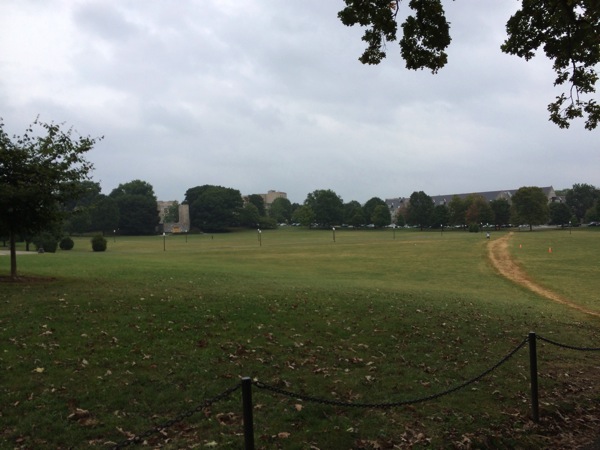
As I mentioned in my previous post, I took a trip to Blacksburg to see my Hokies play. I hadn’t been to Lane Stadium in 5 or 6 years, and I had never sat on the alumni side.
Setting aside the quality of play, the absolutely drenching rain, and the fact that I missed seeing “Enter Sandman”, it was a pretty awesome trip. I snapped a few pictures from our seats using my new iPhone (the 5s).
I took a trip to Blacksburg last weekend to see some friends and check out a VT game. It was my first time back in over 5 years, but I knew it was going to be a short weekend. Fly in on Friday night, hang out all day Saturday, then fly back out on Sunday morning. With such a short window, I didn't want to bring a lot with me. The big question: iPad or laptop.
I decided that I would be able to make it over a weekend with just the iPad and a keyboard. I have a VPN client and a couple of ssh apps; in a pinch, I could hop online and get some work done.
And, wouldn't you know it, first thing Saturday morning, some scripts didn't finish and needed to get checked out. With Prompt 1 and the Apple Bluetooth keyboard, I made quick work of it.
This got me thinking about whether or not I could do most of my job on an iPad with a keyboard. My job, these days, is a lot of email, web apps, and a little bit of programming. All very very possible on the iPad. The only thing that I think might not be convenient on the iPad is our jabber/IM setup. We have a pretty massive contact list and I have yet to find an app that handles it well.
But, my experience last weekend, combined with iOS 7 (background apps), makes me thinks it might be worth a shot one day to just grab a keyboard and my iPad and see how effective I can be.
In that vein, I've been typing this in Editorial 2 – on the built-in soft keyboard on they iPad. Not my fastest typing, but it's manageable. And, if all goes well, this will get posted directly out of Editorial, using one of the workflows that's available on Editorial's workflow site.
If it doesn't go well, it's very likely to be my fault setting up the Wordpress workflow in Editorial. 3
I love the Harmontown podcast for a lot of reasons. It's consistently funny, goofy, and offensive. And, very often, it'll hit these little moments of humanity where you realize that everyone, from a Hollywood writer to someone who considers themselves the loneliest outcast in society, is the same on some level.
There's this unbelievably remarkable sequence about art, how it makes you feel emotionally and physically, which segues into a bit about crying at the launching of the Space Shuttle and when it's appropriate to applaud, jumping back and forth between art and what it means to be paid for art. It's really just this enlightening, uplifting, beautiful conversation.
I don't know that I can do it justice. When you hear people talking about how daunting it is to create (whether it be words, pictures, or music) when you walk into a museum and see the amazing work done by people like Van Gogh or Da Vinci—until you realize that you're seeing only their best work. Or when it is pointed out that Michelangelo had a number of unfinished sculptures after David, because people stopped paying him. They stopped paying Michelangelo.
It's just a brilliant, unscripted sequence that may be one of my favorite things I've heard or seen this year.
And then it's followed up by some Dungeons and Dragons.
Such is life in Harmontown.
Listen starting around 1 hour in (it's almost exactly 1 hour in) until about 1 hour and 40 minutes.
With Apple's announcement of the iPhone 5s (and 5c), Apple moved the iPhone into an interesting space. A good bit of this (iOS7, camera improvements) are catchup with some of the competition.
TouchID, the fingerprint reader, is the game changer. It just won't be the game changer for a couple of years. If you watch the video on iPhone 5s, check out how you can use your fingerprint as a replacement for a password when purchasing from the App Store.
It's not hard to imagine the next step is a Passbook-integration, or some Bluetooth communication mechanism, that will talk right to a point of sale terminal. You walk up, they ring you up, see the Pay with iPhone sign, and you touch your iPhone rather than handing over a credit card. Apple's already got your credit card; rather than passing your credit card to hundreds of merchants over the year, you hand it to one. All secured by your fingerprint.
I have to imagine this is the long-term plan. iPhone 5s is just the wedge to get the technology out into the market.
I'm working my way through The West Wing on Netflix. I haven't seen many of these episodes since they originally aired (for whatever reason, The West Wing somehow did not have a long life in syndication), and I've realized a couple of things:
a) if airing right now, this would be one of the best shows on television,
and
b) this country, as different as it is, is not so different than it was in 1999.
There's been episodes delving into gun control, preemptive military strikes, the efficacy and morality of terrorism (and our response to it), the internet, and more. The list goes on.
It is, easily, as good as I remember, and without a doubt, one of the top 5 TV dramas of all time.
Aside from some visible outdated technology, there's little to place this show in the early 2000s. It could air today and no one would be the wiser.